This page is a part of a series on Everything You Need to Know to Become a Top Contractor on BuildZoom.
Connecting with the homeowner and making a good impression is the first step towards a great client relationship. Over time, the contractors that have solid processes for nurturing leads through thoughtful and frequent messages are more likely to be hired. Whether you prefer to use a desktop computer or text, we’ve made it easy for you to maintain great communication with the prospective client, from the moment you accept a lead to when you get hired.
Topics
- Managing Leads From Your Phone
- Desktop: BuildZoom Dashboard
- Desktop: Personal Email
- Why Thoughtful and Timely Messages Matter
- Final Tips on Messaging
Managing Leads From Your Phone
We know you’re busy on job sites and may not always be by your computer. New leads will be sent via text to your phone, so you can stay updated with new projects wherever you are.
[metaslider id=”11339″]
Click through the screen shots above to see how to review the details of the lead and let us know whether you’re interested in the project. If you think the project is a good fit and you’re interested in connecting with the homeowner, click “Yes”. You now have 4 hours to contact the homeowner before you lose your spot in the project. Not to worry! A simple intro message is enough to get the conversation started, and you can even save messages as templates to respond quickly in the future.
Call or Message From Your Phone
[metaslider id=”11345″]
Desktop: BuildZoom Dashboard
Accept or Decline the Lead
When BuildZoom sends you a lead to a project, they will pop up in the “Projects” tab on the left-hand menu bar in your dashboard. All new leads will fall into the “New” category, and the projects will move through the “Chasing” and “Bid Submitted” stages until you are “Hired”.
PRO TIP: Change the status of each project at every milestone in keep your page organized.
[metaslider id=”11352″]
The first thing you should do is either accept the project by clicking “Yes, View Contact Info”, or decline by clicking “Not Interested” if it’s not a good fit. Make sure you let us know whether you’re interested in the project or not, so we know you’re active and can send you more leads that you like in the future.
Send A Message Through the Projects Tab
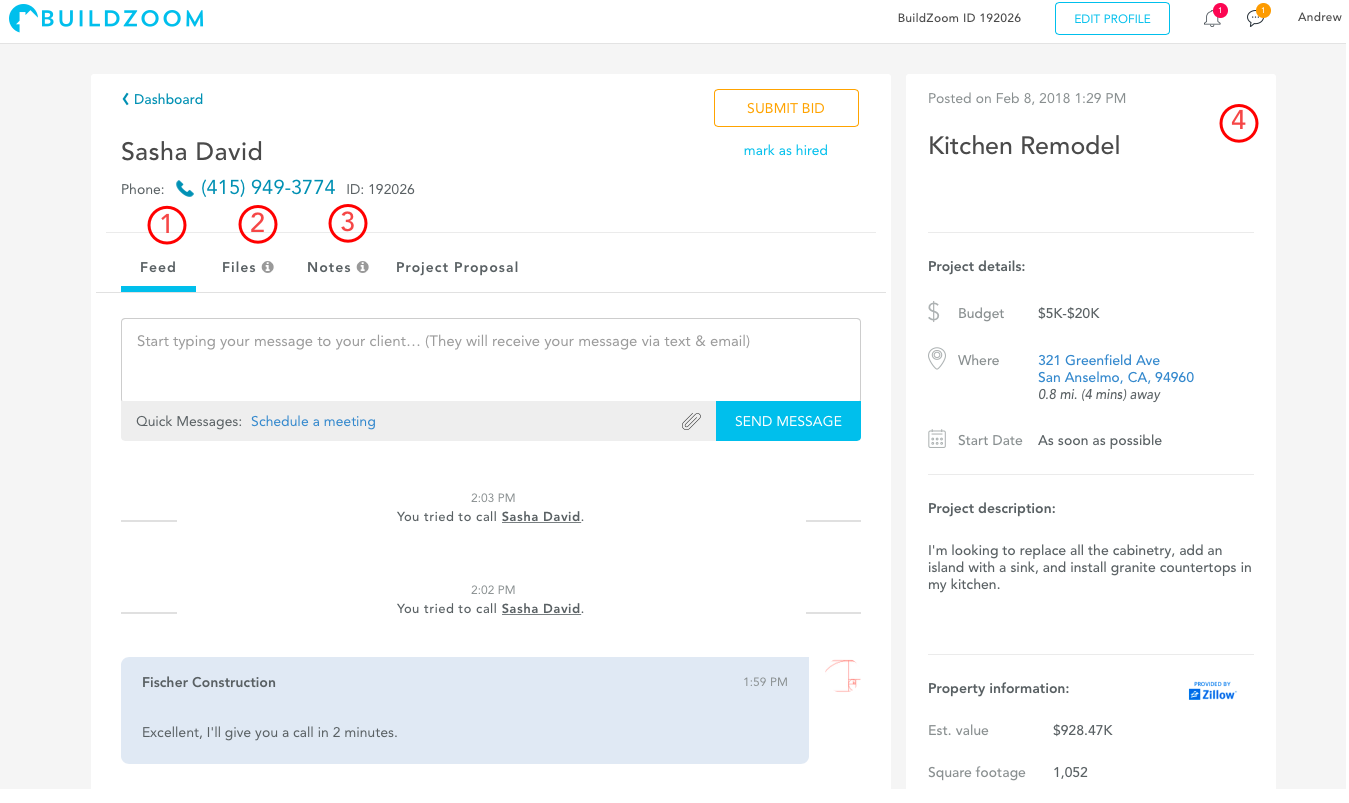
The easiest way to manage your communications with the client is through your BuildZoom account on a desktop. From the Projects tab, you can click on a project and have all of the information you need to message and send files.
1. Feed: This is where you can start messaging the homeowner. The feed shows you all of your previous messages with the homeowner, and includes some nifty features like pre-written introductions or messages to schedule a meeting. PRO TIP: You can also attach and send files directly through the feed, such as before and after photos of your work. Most formats will work, but dropbox links will have to be included in the message body.
2. Files: Store all of your files relating to the project in the Files menu.
3. Notes: Take notes during your calls or messages with the homeowner to quickly remind yourself of what was previously discussed. Your notes will not be visible to the homeowner.
4. Quick-Facts: Project details including job description, address, budget, and property value are listed on the right hand side for easy reference.
Message from the Messages Tab
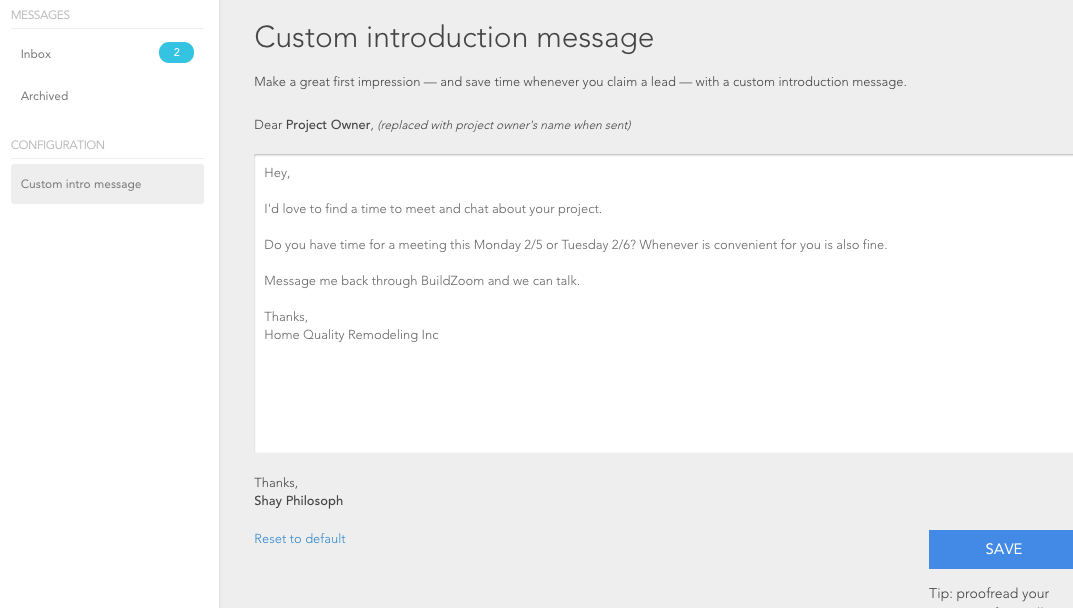
You can also click the Messages tab on the far-left menu to be taken to your inbox where you can read, respond, or archive your messages. The Configuration feature allows you to create and save custom templates, so you can quickly send introduction messages to future leads.
Send Messages Directly From Your Email
Messages are also automatically forwarded to your personal email account. If you receive a new client message, you can reply directly to the email to respond.
[metaslider id=”11363″]
Why Thoughtful and Timely Messages Matter
Clients make their decisions on who to hire based on a lot of considerations, but according to BuildZoom’s studies, trustworthiness is among the top factors. Proactively messaging in a professional and friendly manner will help build confidence in your business’ brand, and answering promptly will demonstrate that you are reliable.
Not sure what to message? Here are some samples of templates you can set in your Messages tab so that you know how to phrase your messages and reduce the time spent typing them out.
1. Sample Introductory message
Hi ____,
I was hoping to connect with you to discuss your project in . We are a full service remodeling contractor that has extensive experience in and I would love to take a look at your potential project. Let me know if you would like a free estimate and we can schedule a meeting!
2. Scheduling a walk-through
Hi ____,
I will be in the area on Thursday and have availability on my schedule to take a look at your project. Do you have time to meet?
3. Scheduling message # 2 (Open opportunity – Cancellation)
Hi ____,
I wanted to let you know we just had a space open up in our schedule, we can potentially start your project in the next month. I’d love to take a look at your project and see what you’re envisioning for your <Kitchen/Bath/Home remodel>.
4. Sending photos of past work
Hi ____,
I have include some photos of a project we just completed in . This <Kitchen/Bath/Home remodel> is an excellent example of our typical finished product. Is this a style similar to what you had in mind for your project?
5. Sharing testimonials
Hi ____,
I wanted to share feedback we received from some recent clients: Our business take pride in delighting our customers by exceeding their expectations on every project we perform. If you would like to speak with any of our past clients, I’m happy to put you in touch with some that live nearby.
6. Sample timeline message
Hi ____,
We recently completed a similar <Kitchen/Bath/Home remodel> project in and I wanted to share with you the rough timeline for that project. This may help you get an idea of what to expect when remodeling your own <Kitchen/Bath/Home remodel>.
7. Sample pricing message
Hi ____,
We recently completed a similar <Kitchen/Bath/Home remodel> project in and I wanted to share with you the general project cost for that project. This may help you get an idea of what to expect when remodeling your own <Kitchen/Bath/Home remodel> I can deliver a free estimate by Thursday i you’d like to discuss your project in further detail.
8. Confirmation message
Hi ____,
Looking forward to meeting with you at on <day, date, at time>. Should anything arise in the interim, please let me know.
Final Tips on Messaging
1. Send messages regularly
Sending helpful messages on a regular basis will trigger responses from the homeowner and keep the conversation going. Be sure to follow up if they don’t respond.
2. Set the tone early
First impressions matter. Responding quickly to the lead will help you be remembered.
3. Use messaging templates
Optimize your lead generation and spend less time typing messages.
4. Send photos of your work
Photos will help the homeowner choose what designs they like, and before and after photos are a great way to showcase your work.